
Introduction:
Introduction to Malerlite vs MailChimp
In the world of digital marketing, email remains one of the most effective channels for connecting with customers, nurturing leads, and driving conversions. However, with numerous email marketing services available, choosing the right platform for your business can be a daunting task. Two of the most popular options are MailerLite and MailChimp, but which one is the better choice?
This comprehensive guide will dive deep into the battle of MailerLite vs MailChimp, evaluating their features, pricing, ease of use, and more. Whether you’re a small business owner, a marketing professional, or an entrepreneur, this comparison will provide you with the insights you need to make an informed decision and maximize the impact of your email marketing efforts.
Email marketing is a powerful tool for building relationships with your audience, promoting your products or services, and driving revenue growth. However, choosing the wrong platform can lead to frustrations, inefficiencies, and missed opportunities. By understanding the strengths and weaknesses of MailerLite vs MailChimp, you can select the platform that aligns best with your business goals, budget, and marketing strategies.
In this guide, we’ll explore key areas such as:
-
- Pricing and cost structures
-
- Email creation and template options
-
- Automation and workflow capabilities
-
- List management and segmentation tools
-
- Reporting and analytics features
-
- Integrations and add-ons
-
- Deliverability and sender reputation
-
- Customer support and ease of use
Whether you’re a seasoned email marketer or just starting, this comprehensive comparison will provide valuable insights to help you navigate the landscape of MailerLite vs MailChimp and make the best choice for your business.
So, let’s dive in and explore which email marketing service – MailerLite or MailChimp – is the better fit for your specific needs and goals.
One of the most important factors to consider when choosing an email marketing service is the pricing and cost. In the battle of MailerLite vs MailChimp, there are some significant differences in their pricing structures that may sway your decision.
MailerLite’s Pricing MailerLite takes a straightforward approach to pricing, basing their plans solely on the number of subscribers in your email list. Their pricing starts at $9/month for up to 500 subscribers, with plans scaling up as your list grows. here are $0 plan as well for 1000 subscribers. There are no additional fees for features or add-ons, making it easy to predict your monthly costs.
MailChimp’s Pricing MailChimp, on the other hand, has a more complex pricing model that factors in both the number of subscribers and the additional features you require. Their pricing starts at $9.99/month for up to 5000 emails on the “Essentials” plan, which includes basic email marketing features. There is a free plan as well for 1000 emails a month but only one admin person, restrictions on the support and features. To access more advanced features like multi-step journeys, custom-coded templates, and advanced segmentation, you’ll need to upgrade to the “Standard” or “Premium” plans, which can significantly increase your monthly costs.
Additionally, MailChimp charges extra for add-ons like purchase behavior data, advanced audience insights, and social media advertising integration. These additional costs can quickly add up, making it more challenging to predict your monthly expenses accurately.
For small businesses or those with modest email lists, MailerLite’s straightforward pricing and lack of additional fees make it a more cost-effective option compared to MailChimp. However, as your list grows and your email marketing needs become more advanced, MailChimp’s feature-rich plans may justify the higher costs.
When evaluating MailerLite vs MailChimp in terms of pricing and cost, it’s essential to consider your current email marketing requirements and potential future needs. While MailerLite may be more affordable initially, MailChimp’s flexibility and advanced features could provide better value in the long run for larger or more complex email marketing campaigns.
Email Marketing Features: MailerLite vs MailChimp
When it comes to email marketing services, the range of features offered can significantly impact your campaigns’ success. In the battle of MailerLite vs MailChimp, both platforms offer a wide array of features, but there are some key differences to consider.
Email Editor and Templates
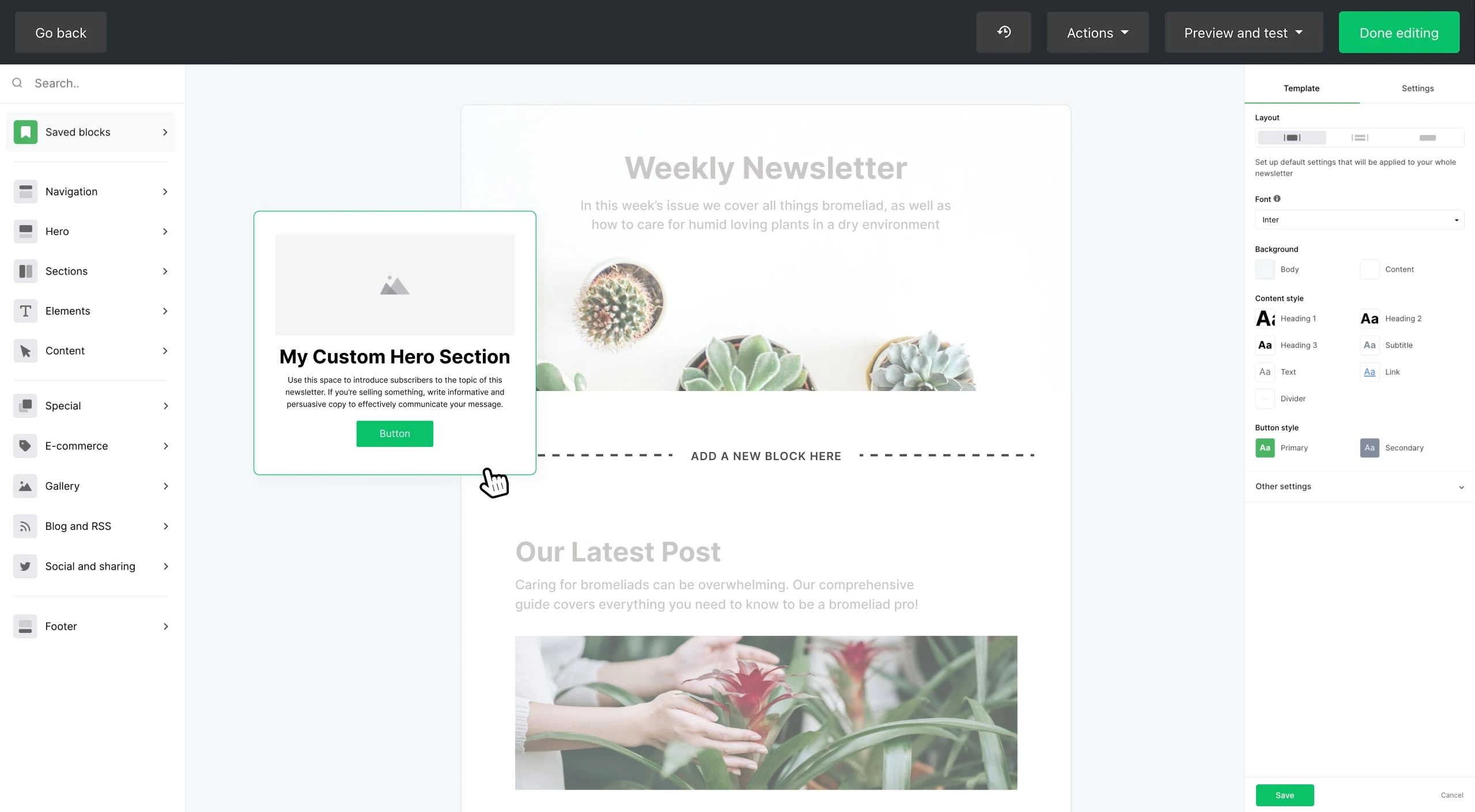
Both MailerLite and MailChimp provide user-friendly email editors and a library of customizable templates. However, MailChimp’s editor is more feature-rich, offering advanced design options and the ability to create complex, custom-coded templates.

MailerLite’s editor, while more straightforward, is often praised for its ease of use and simplicity, making it a great choice for those new to email marketing.
Email Automation and Workflows
MailChimp shines when it comes to email automation and workflows. Their automation builder allows for advanced, multi-step campaigns triggered by various user actions and behaviors. MailerLite offers automation capabilities as well, but they are more basic and may have a steeper learning curve for complex automations.
List Management and Segmentation
Both platforms offer tools for managing and segmenting your email lists, but MailChimp’s segmentation options are more extensive. With MailChimp, you can create highly granular segments based on various criteria, including demographics, behavior, and purchase data.
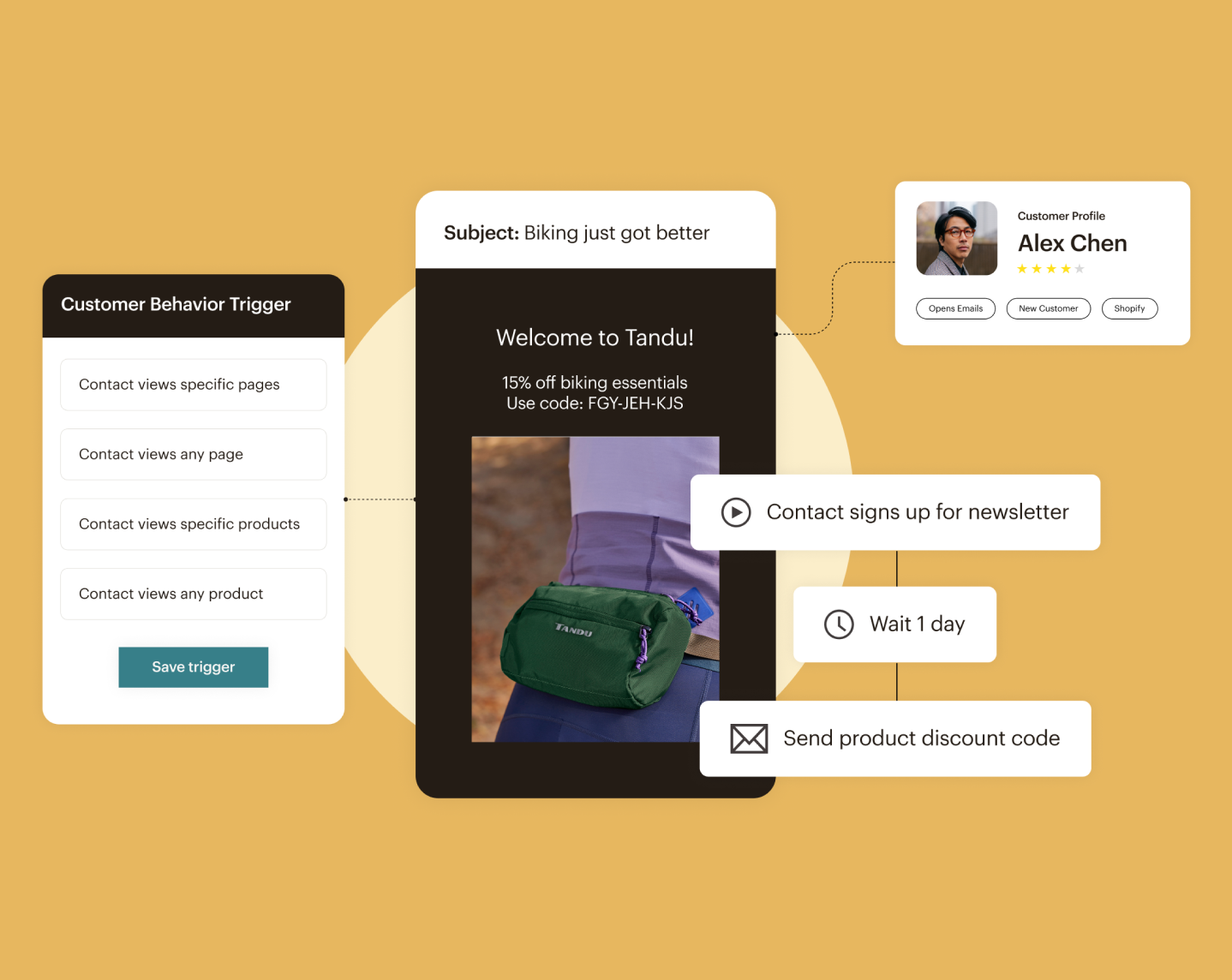
MailerLite’s segmentation capabilities are adequate for basic needs but may be more limited for advanced targeting scenarios.
Advanced Features
MailChimp offers a wider range of advanced features beyond email marketing, such as landing pages, abandoned cart functionality, and social media advertising integrations.
When evaluating MailerLite vs MailChimp in terms of features, MailChimp offers a more comprehensive and powerful suite of tools, especially for those with more complex email marketing needs. However, MailerLite’s simplicity and focus on core email marketing may be more appealing for businesses with more basic requirements or those just starting out with email marketing.
Deliverability Rates: MailerLite vs MailChimp
Ensuring your emails reach your subscribers’ inboxes is crucial for the success of your email marketing campaigns. In the battle of MailerLite vs MailChimp, both email service providers (ESPs) have robust deliverability mechanisms in place, but there are some differences to consider.
MailChimp’s Deliverability
MailChimp has a well-established reputation for high deliverability rates, thanks to their strict policies and rigorous approval process. They actively monitor and suspend accounts that engage in spamming or other questionable practices, helping to maintain their overall sender reputation.
MailChimp also provides tools and resources to help users improve their deliverability, such as inbox placement reports, content analysis, and authentication setup guides.
MailerLite’s Deliverability
While MailChimp has a slight edge in terms of reputation, MailerLite’s deliverability is still excellent. They employ various measures to ensure high inbox delivery rates, including:
-
- Strict anti-spam policies
-
- Authentication protocols (SPF, DKIM, and DMARC)
-
- Feedback loop management
-
- Dedicated IP addresses (available on higher-tier plans)
MailerLite also offers deliverability tools, such as inbox testing and real-time delivery reports, to help users monitor and optimize their campaigns.
Factors Affecting Deliverability
It’s important to note that deliverability is not solely determined by the ESP you choose. Several factors, such as list quality, content, and engagement rates, play a crucial role in determining whether your emails end up in the inbox or the spam folder.
Both MailerLite and MailChimp provide guidance and best practices to help users maintain high deliverability standards, including advice on content creation, list hygiene, and subscriber engagement strategies.
While MailChimp has a slight edge in terms of reputation and deliverability, the difference between MailerLite vs MailChimp is relatively small. By following best practices and utilizing the tools provided by either ESP, you can achieve excellent deliverability rates and ensure your emails reach their intended audience.
Integrations: MailerLite vs MailChimp
In today’s digital landscape, integrating your email marketing service with other tools and platforms is crucial for streamlining workflows and maximizing efficiency. When it comes to MailerLite vs MailChimp, both platforms offer a range of integrations, but MailChimp has a more extensive selection.
MailChimp’s Integrations
MailChimp boasts a vast ecosystem of integrations, allowing you to connect with a wide variety of tools and services. From e-commerce platforms like Shopify, WooCommerce, and Magento, to customer relationship management (CRM) systems like Salesforce and HubSpot, MailChimp integrates seamlessly with many popular applications.
Additionally, MailChimp offers an open API and developer resources, enabling custom integrations and more advanced functionality for tech-savvy users.
MailerLite’s Integrations
While MailerLite’s selection of integrations is more limited compared to MailChimp, it still covers many essential tools and platforms. Some of MailerLite’s notable integrations include:
-
- E-commerce: WooCommerce, Shopify, Ecwid
-
- CRMs: Salesforce, HubSpot, Pipedrive
-
- Analytics: Google Analytics, Facebook Pixel
-
- Webinar platforms: WebinarJam, EverWebinar
MailerLite also provides an API and developer documentation, allowing for custom integrations if needed.
Choosing the Right Integrations
When evaluating MailerLite vs MailChimp, it’s essential to consider the tools and platforms you currently use or plan to use in the future. If you rely heavily on a specific CRM, e-commerce platform, or other software, you’ll want to ensure that your chosen email marketing service integrates seamlessly with those tools.
While MailChimp offers a more extensive selection of integrations out-of-the-box, MailerLite’s integrations may be sufficient for businesses with more modest integration needs. Additionally, both platforms provide APIs for custom integrations, allowing for more flexibility if necessary.
By carefully assessing your integration requirements and the tools you use, you can make an informed decision between MailerLite vs MailChimp based on their integration capabilities and ensure a seamless workflow across your various platforms.
Ease of Use: MailerLite vs MailChimp
When it comes to email marketing services, a user-friendly interface and a low learning curve can make a significant difference, especially for those new to the platform or with limited technical expertise. In the battle of MailerLite vs MailChimp, there are distinct differences in terms of ease of use.
MailerLite’s Simplicity
MailerLite prides itself on its intuitive and straightforward interface, making it an excellent choice for beginners or those who prioritize simplicity. The platform’s clean layout and streamlined navigation make it easy to navigate and understand, even for those with little to no prior experience with email marketing.
From creating and designing email campaigns to managing subscribers and automations, MailerLite’s user experience is designed to be as user-friendly as possible, minimizing the learning curve and allowing users to get up and running quickly.
MailChimp’s Feature-Rich Interface
While MailChimp offers a wealth of powerful features and customization options, its interface can be more overwhelming for those new to the platform. With numerous menus, settings, and advanced tools, the learning curve can be steeper, especially for those without prior email marketing experience.
However, for experienced users or those willing to invest time in learning the platform, MailChimp’s feature-rich interface provides greater flexibility and control over various aspects of email marketing campaigns.
User Onboarding and Support
Both MailerLite and MailChimp offer resources and support to help users get started and navigate their respective platforms. MailerLite’s onboarding process is often praised for its simplicity, with clear guidance and tutorials.
MailChimp also provides extensive documentation, video tutorials, and customer support channels, but the sheer volume of information can be overwhelming for some users.
When evaluating MailerLite vs MailChimp in terms of ease of use, MailerLite emerges as the more user-friendly option, particularly for small businesses, beginners, or those seeking a more straightforward email marketing solution. However, MailChimp’s advanced features and customization options may be more appealing for experienced users or those with more complex email marketing needs, provided they are willing to invest time in learning the platform.
Templates and Customization: MailerLite vs MailChimp
Here’s a comparison of the ease of use between MailerLite vs MailChimp, using the focus keyword:
Ease of Use: MailerLite vs MailChimp
Having access to a wide range of professional and visually appealing email templates can save time and effort when creating campaigns. In the battle of MailerLite vs MailChimp, both platforms offer a variety of templates to choose from, but there are some notable differences.
MailerLite’s Templates
MailerLite provides a decent selection of email templates that are clean, modern, and mobile-responsive. While the number of templates is more limited compared to MailChimp, MailerLite’s templates are designed to be easy to customize and edit using their user-friendly drag-and-drop email builder.
MailerLite’s templates cover a range of industries and purposes, including newsletters, promotions, announcements, and more. Users can easily add or remove sections, adjust colors and fonts, and customize the templates to fit their brand’s style and needs.
MailChimp’s Template Library
MailChimp boasts an extensive library of email templates, offering a wide variety of designs and styles to choose from. With hundreds of templates available, users have a vast selection to work with, covering different industries, types of campaigns, and design aesthetics.
In addition to pre-designed templates, MailChimp allows users to create custom-coded templates using HTML and CSS, providing more flexibility and control for advanced users or designers.
Template Customization and Flexibility
Both MailerLite and MailChimp offer drag-and-drop email builders for customizing templates, but MailChimp’s editor is more robust and feature-rich. With MailChimp, users have access to more advanced design options, including custom coding capabilities and the ability to save and reuse content blocks across multiple campaigns.
When it comes to templates, MailChimp’s extensive library and advanced customization options give it an edge over MailerLite. However, MailerLite’s templates are still visually appealing and easy to customize, making them a solid choice for those with more modest design needs or those prioritizing simplicity.
Ultimately, the decision between MailerLite vs MailChimp in terms of templates will depend on your specific design requirements, the level of customization desired, and the resources available for creating and maintaining email templates.
Analytics and Reporting: MailerLite vs MailChimp
Tracking and analyzing the performance of your email campaigns is crucial for understanding what resonates with your audience and optimizing your marketing efforts. In the battle of MailerLite vs MailChimp, both platforms offer analytics and reporting tools, but MailChimp provides more comprehensive and in-depth insights.
MailChimp’s Advanced Analytics
MailChimp’s analytics capabilities are one of its standout features. The platform provides detailed reports and insights into various aspects of your email campaigns, subscriber behavior, and overall performance.
Some of MailChimp’s key analytics features include:
-
- Campaign reports: Open rates, click-through rates, bounce rates, and more
-
- Subscriber activity: Engagement levels, location data, and device usage
-
- Revenue tracking: Integration with e-commerce platforms for sales data
-
- Comparative reports: Compare performance across campaigns or time periods
-
- Advanced segmentation: Analyze data based on specific segments or groups
MailChimp’s analytics tools also offer customizable reporting and the ability to create custom dashboards tailored to your specific needs.
MailerLite’s Analytics
While MailerLite’s analytics capabilities are not as robust as MailChimp’s, they still provide useful insights and reporting for monitoring the success of your email campaigns.
[Add a screenshot of MailerLite’s analytics or reporting section]
MailerLite’s analytics features include:
-
- Campaign reports: Open rates, click-through rates, unsubscribe rates
-
- Subscriber engagement: Tracking opens, clicks, and interactions
-
- Geo-tracking: See where your subscribers are located
-
- Campaign comparisons: Compare performance across different campaigns
MailerLite’s analytics are straightforward and easy to understand, making them suitable for businesses with more basic reporting needs or those new to email marketing analytics.
Choosing the Right Analytics
When evaluating MailerLite vs MailChimp in terms of analytics, it’s essential to consider your specific reporting requirements and the level of insights you need to optimize your email marketing strategies.
If you require advanced analytics, in-depth subscriber behavior tracking, revenue attribution, or highly customizable reporting, MailChimp’s comprehensive analytics tools may be a better fit. However, if your analytics needs are more modest, or you prioritize simplicity, MailerLite’s reporting capabilities may be sufficient.
Regardless of which platform you choose, regularly analyzing and acting on the insights provided by their respective analytics tools can help you make data-driven decisions, improve campaign performance, and ultimately drive better results from your email marketing efforts.
Automation Capabilities: MailerLite vs MailChimp
Email automation is a powerful tool that can help streamline your marketing efforts, nurture leads, and deliver personalized experiences to your subscribers. In the battle of MailerLite vs MailChimp, both platforms offer automation features, but MailChimp’s capabilities are more extensive and advanced.
MailChimp’s Automation Builder
MailChimp’s automation builder is a robust and feature-rich tool that allows you to create complex, multi-step workflows based on various triggers and conditions. With MailChimp, you can automate a wide range of tasks, from welcome series and abandoned cart sequences to post-purchase follow-ups and re-engagement campaigns.
Some of MailChimp’s key automation features include:
-
- Trigger-based automation: Based on subscriber actions, behaviors, or data
-
- Advanced segmentation: Automate campaigns for specific segments or groups
-
- Branching and conditional logic: Create dynamic paths based on subscriber actions
-
- E-commerce automation: Abandoned cart reminders, order notifications, and more
-
- Integration with other platforms: Sync data and automate workflows across tools
MailChimp’s automation capabilities are highly flexible and customizable, making it a powerful tool for businesses with complex automation needs.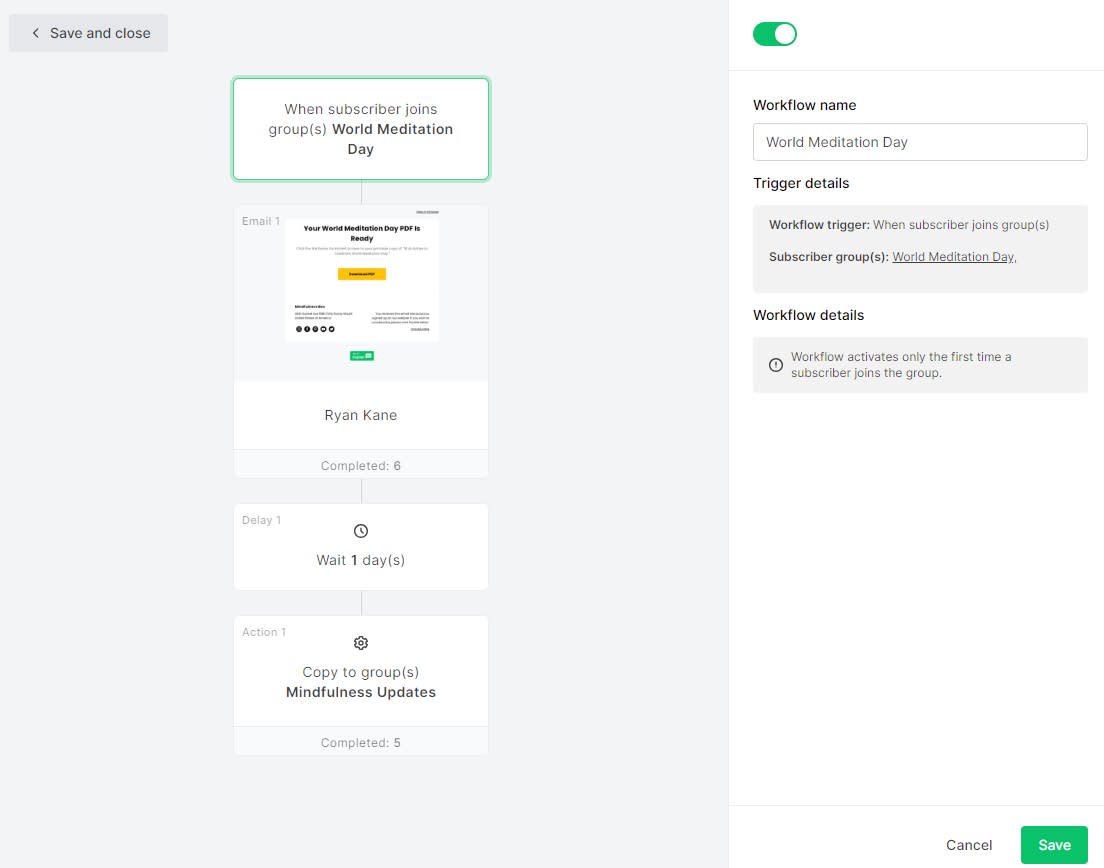
MailerLite’s Automation Workflows
While MailerLite’s automation features are not as robust as MailChimp’s, they still offer solid capabilities for creating automated email sequences and workflows.
With MailerLite, you can set up:
-
- Welcome series for new subscribers
-
- Automated follow-up sequences based on subscriber actions or inactions
-
- Date-based automation (e.g., birthday or anniversary emails)
-
- Opt-in and double opt-in confirmation sequences
MailerLite’s automation workflows are relatively straightforward and easy to set up, making them a good option for businesses with more basic automation needs or those just starting with email automation.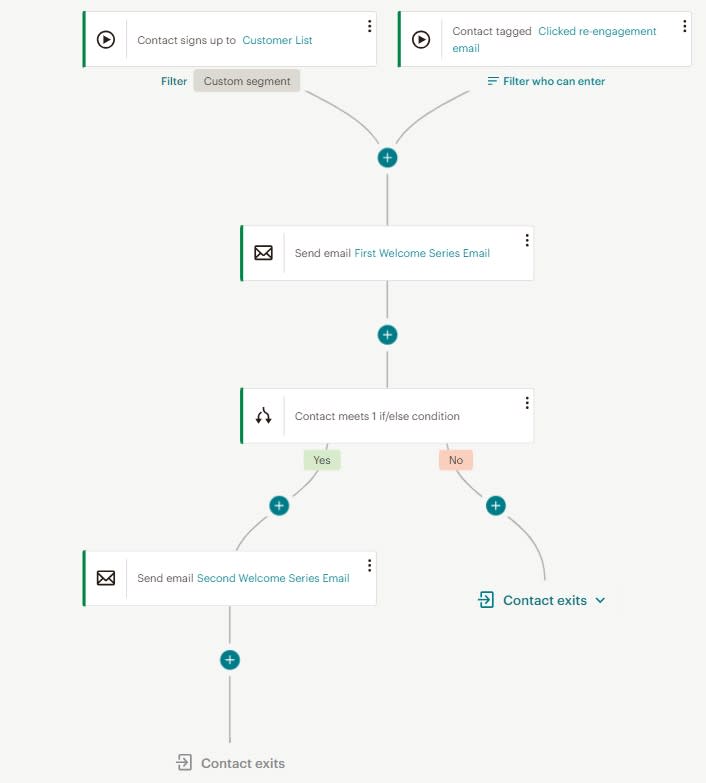
Learning Curve and Complexity
One notable difference between MailerLite vs MailChimp’s automation capabilities is the learning curve and complexity involved.
MailChimp’s automation builder is more powerful but can also be more challenging to master, especially for those new to email automation or without dedicated marketing resources. The platform offers extensive documentation and tutorials, but there may still be a steeper learning curve.
MailerLite’s automation workflows, while less feature-rich, are generally more user-friendly and easier to set up, making them a good choice for small businesses or those looking for a more straightforward approach to email automation. While MailerLite offers automation in its free plan MailChimp does not.
When evaluating MailerLite vs MailChimp for email automation, consider your business’s specific needs, the level of complexity you’re comfortable with, and the resources you have available for setting up and managing automated campaigns. MailChimp’s advanced capabilities may be better suited for businesses with complex automation requirements, while MailerLite’s more streamlined approach could be a better fit for those with more modest automation needs or limited resources.
Customer Support: MailerLite vs MailChimp
Here’s a comparison of the customer support offered by MailerLite vs MailChimp, using the focus keyword:
Customer Support: MailerLite vs MailChimp
Reliable customer support is essential when using any software or platform, especially for something as crucial as email marketing. In the battle of MailerLite vs MailChimp, both providers offer various support channels, but there are differences in their approach and the quality of support.
MailerLite’s Customer Support
MailerLite is widely praised for its exceptional customer support, with many users commending the responsiveness, helpfulness, and knowledgeability of their support team.
MailerLite offers the following support channels:
-
- Email support: Receive responses within a few hours during business hours
-
- Live chat: Available during specific hours for real-time assistance
-
- Knowledge base: Comprehensive self-help resources and tutorials
-
- Video tutorials: Step-by-step guides on various features and tasks
While MailerLite doesn’t offer phone support, their email and live chat support are known for providing prompt, friendly, and effective solutions to users’ queries and issues.
MailChimp’s Customer Support
MailChimp also provides multiple support channels, including:
-
- Email support
-
- Live chat
-
- Phone support (for higher-tier plans)
-
- Extensive knowledge base
-
- Community forums
While MailChimp’s support resources are vast, some users have reported inconsistencies in the quality and timeliness of their support, especially for more complex or technical issues.
Choosing the Right Support
When evaluating MailerLite vs MailChimp in terms of customer support, it’s essential to consider your specific needs and preferences.
If you value prompt, personalized, and knowledgeable support, MailerLite’s customer service is often regarded as superior. Their smaller size may contribute to a more focused and dedicated support team.
However, if you prefer having multiple support channels available, including phone support, or if you anticipate needing more extensive resources for complex issues, MailChimp’s broader range of support options may be more suitable.
Additionally, consider the level of technical expertise within your team. If you have limited in-house expertise, a more responsive and hands-on support team like MailerLite’s could be invaluable.
Ultimately, the quality of customer support can significantly impact your overall experience with an email marketing platform, so it’s crucial to factor in this aspect when choosing between MailerLite vs MailChimp.
Compliance: MailerLite vs MailChimp
Here’s a comparison of the customer support offered by MailerLite vs MailChimp, using the focus keyword:
Customer Support: MailerLite vs MailChimp
Reliable customer support is essential when using any software or platform, especially for something as crucial as email marketing. In the battle of MailerLite vs MailChimp, both providers offer various support channels, but there are differences in their approach and the quality of support.
MailerLite’s Customer Support MailerLite is widely praised for its exceptional customer support, with many users commending the responsiveness, helpfulness, and knowledgeability of their support team.
MailerLite offers the following support channels:
-
- Email support: Receive responses within a few hours during business hours
-
- Live chat: Available during specific hours for real-time assistance
-
- Knowledge base: Comprehensive self-help resources and tutorials
-
- Video tutorials: Step-by-step guides on various features and tasks
While MailerLite doesn’t offer phone support, their email and live chat support are known for providing prompt, friendly, and effective solutions to users’ queries and issues.
MailChimp’s Customer Support MailChimp also provides multiple support channels, including:
-
- Email support
-
- Live chat
-
- Phone support (for higher-tier plans)
-
- Extensive knowledge base
-
- Community forums
While MailChimp’s support resources are vast, some users have reported inconsistencies in the quality and timeliness of their support, especially for more complex or technical issues.
Choosing the Right Support When evaluating MailerLite vs MailChimp in terms of customer support, it’s essential to consider your specific needs and preferences.
If you value prompt, personalized, and knowledgeable support, MailerLite’s customer service is often regarded as superior. Their smaller size may contribute to a more focused and dedicated support team.
However, if you prefer having multiple support channels available, including phone support, or if you anticipate needing more extensive resources for complex issues, MailChimp’s broader range of support options may be more suitable.
Additionally, consider the level of technical expertise within your team. If you have limited in-house expertise, a more responsive and hands-on support team like MailerLite’s could be invaluable.
Ultimately, the quality of customer support can significantly impact your overall experience with an email marketing platform, so it’s crucial to factor in this aspect when choosing between MailerLite vs MailChimp
Conclusion: MailerLite vs MailChimp:
Conclusion: MailerLite vs MailChimp – Which One is Right for You?
Choosing the right email marketing platform is a critical decision that can significantly impact the success of your campaigns and your overall marketing efforts. In the battle of MailerLite vs MailChimp, both platforms offer a robust set of features and capabilities, but the ideal choice will depend on your specific business needs and priorities.
MailerLite shines as a user-friendly and cost-effective solution, making it an excellent choice for small businesses, beginners, or those with more modest email marketing requirements. Its clean interface, streamlined automation workflows, and exceptional customer support make it a great option for those prioritizing ease of use and affordability.
On the other hand, MailChimp is a powerful and feature-rich platform that excels in areas such as advanced automation, comprehensive analytics, and a vast ecosystem of integrations. While it may have a steeper learning curve and higher costs, MailChimp is well-suited for businesses with complex email marketing needs, larger lists, or those requiring more scalability and advanced features.
When evaluating MailerLite vs MailChimp, consider factors such as your budget, the size of your email list, the complexity of your automation requirements, the level of customization you need, and the level of support you anticipate requiring.
Ultimately, the choice between MailerLite and MailChimp will depend on balancing your specific needs, resources, and priorities. It’s essential to carefully assess each platform’s strengths and weaknesses to determine which one aligns best with your business goals and email marketing strategies.
Whichever platform you choose, remember that successful email marketing requires not only the right tools but also a solid understanding of best practices, audience engagement, and continuous optimization. By leveraging the capabilities of either MailerLite or MailChimp and following industry best practices, you can effectively nurture your email subscriber base, deliver value, and drive tangible results for your business.